> ## Documentation Index
> Fetch the complete documentation index at: https://docs.healthkeri.com/llms.txt
> Use this file to discover all available pages before exploring further.
# Software
> Download and install Locksmith and our tutorial repository.
**Prerequisites**: Please see [Environment](/environment) before proceeding.
Follow these steps to install and run our tutorials on your operating system:
### Download and Install
**Step 1**: Install Locksmith:
Locksmith is our [KERI](/essentials/overview) identity wallet and secure web proxy GUI. We currently have installable versions for macOS (arm64) and Windows 11 PCs. To use any other operating system, you can download our Python Wheel and install as described below
(Other native installers will be available shortly)
```bash Shell theme={null}
curl -s -L -o locksmith.dmg https://healthkeri-deployment.sfo3.digitaloceanspaces.com/locksmith/v0.0.1/MacOS/Locksmith.dmg
```
Or you can download [Locksmith](https://healthkeri-deployment.sfo3.digitaloceanspaces.com/locksmith/v0.0.1/MacOS/Locksmith.dmg) directly.
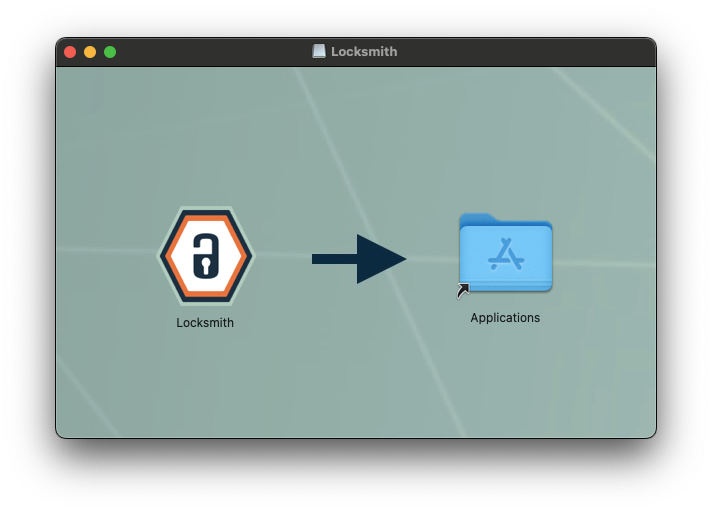
Locate `locksmith.dmg` in Finder, double click and drag the Locksmith Icon into Applications folder.
 ```bash Shell theme={null}
curl -s -L -o locksmith.zip https://healthkeri-deployment.sfo3.digitaloceanspaces.com/locksmith/v0.0.1/Windows/Locksmith.zip
```
Or you can download [Locksmith](https://healthkeri-deployment.sfo3.digitaloceanspaces.com/locksmith/v0.0.1/Windows/Locksmith.zip) directly.
Locate `locksmith.zip` in Windows Explorer, extract with 7-Zip or your choice of extractor. Inside the extracted
folder, right click `Locksmith.exe` to create a shortcut or double click to run from inside the folder.
If you are using an operation system other than macOS, you need to use the correct version of Python specified [here](/environment):
```bash Shell theme={null}
python -m venv ./locksmith
source ./locksmith/bin/activate
curl -s -L -o rack-1.0.0-py3-none-any.whl https://healthkeri-deployment.sfo3.digitaloceanspaces.com/rack/rack-1.0.0-py3-none-any.whl
curl -s -L -o Locksmith-0.0.1-py3-none-any.whl https://healthkeri-deployment.sfo3.digitaloceanspaces.com/locksmith/v0.0.1/Locksmith-0.0.1-py3-none-any.whl
pip install rack-1.0.0-py3-none-any.whl
pip install Locksmith-0.0.1-py3-none-any.whl
```
**Recommended:** We recommend using a unique Python virtual environment as detailed above.
**Step 2**: Clone the healthKERI [rack-docker](https://github.com/healthKERI/rack-docker) repository:
```bash Git theme={null}
git clone https://github.com/healthKERI/rack-docker.git
cd rack-docker
```
**Note**: Please see this [Guide](https://docs.github.com/en/enterprise-server@3.13/desktop/overview/getting-started-with-github-desktop) for using GitHub Desktop instead of the command line.
```bash Shell theme={null}
curl -s -L -o locksmith.zip https://healthkeri-deployment.sfo3.digitaloceanspaces.com/locksmith/v0.0.1/Windows/Locksmith.zip
```
Or you can download [Locksmith](https://healthkeri-deployment.sfo3.digitaloceanspaces.com/locksmith/v0.0.1/Windows/Locksmith.zip) directly.
Locate `locksmith.zip` in Windows Explorer, extract with 7-Zip or your choice of extractor. Inside the extracted
folder, right click `Locksmith.exe` to create a shortcut or double click to run from inside the folder.
If you are using an operation system other than macOS, you need to use the correct version of Python specified [here](/environment):
```bash Shell theme={null}
python -m venv ./locksmith
source ./locksmith/bin/activate
curl -s -L -o rack-1.0.0-py3-none-any.whl https://healthkeri-deployment.sfo3.digitaloceanspaces.com/rack/rack-1.0.0-py3-none-any.whl
curl -s -L -o Locksmith-0.0.1-py3-none-any.whl https://healthkeri-deployment.sfo3.digitaloceanspaces.com/locksmith/v0.0.1/Locksmith-0.0.1-py3-none-any.whl
pip install rack-1.0.0-py3-none-any.whl
pip install Locksmith-0.0.1-py3-none-any.whl
```
**Recommended:** We recommend using a unique Python virtual environment as detailed above.
**Step 2**: Clone the healthKERI [rack-docker](https://github.com/healthKERI/rack-docker) repository:
```bash Git theme={null}
git clone https://github.com/healthKERI/rack-docker.git
cd rack-docker
```
**Note**: Please see this [Guide](https://docs.github.com/en/enterprise-server@3.13/desktop/overview/getting-started-with-github-desktop) for using GitHub Desktop instead of the command line.
### Launching Locksmith
If you downloaded one of our native installers for [Locksmith](#download-and-install) please use your Operating System to find and launch the application.
If you installed the Python wheel in a virtual machine, you can launch Locksmith with the following command:
```bash theme={null}
source ${PATH_TO_VENV}/bin/activate
lockmsith
```
Locksmith will attempt to create database files in one of two directories. If you have a directory named `/usr/local/var/keri` and the current user has write access to that directory it will create all database files and keystores at that location.
Otherwise, it will create and use a directory named `.keri` in the current user's home directory. If you want to back up your KERI identity information and your keystore, you can back up which ever of these two directories is created on your device.
For more information see the [KERI Python Reference Implementation](https://github.com/WebOfTrust/keripy).